INP: The Core Web Vitals Score WordPress Keeps Failing
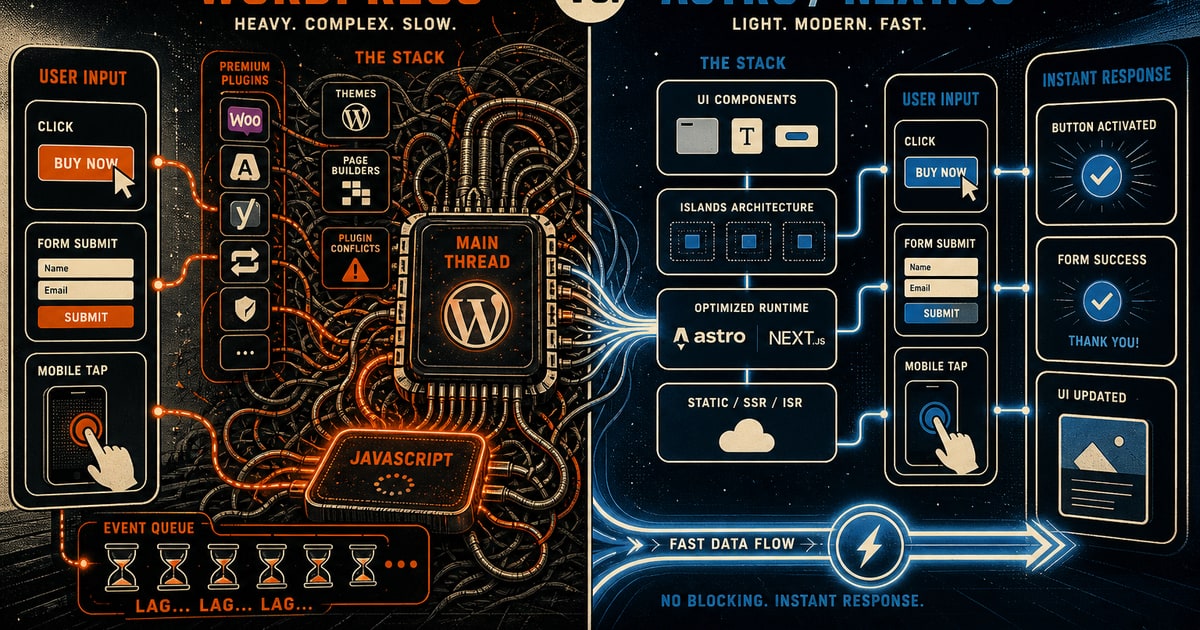
Google confirmed a major shift in March 2024: Interaction to Next Paint (INP) replaced First Input Delay (FID) as a Core Web Vitals metric. FID only measured the delay before a browser responded to input. INP measures the full lifecycle of an interaction, from the initial click to the moment the page visually updates. This change exposed a long-standing issue with page builder driven WordPress sites. A site could pass FID while still feeling slow to real users clicking menus, submitting forms, or tapping mobile buttons. INP removes that illusion.
Field data published throughout 2025 shows a consistent pattern. WordPress sites built with popular page builders like Elementor, Divi, or WPBakery frequently fall into the “needs improvement” range of 200 to 500 milliseconds or the “poor” range above 500 milliseconds for INP. The issue is not WordPress alone. It is the cumulative JavaScript load introduced by modern plugin stacks. A typical setup includes the builder runtime, form plugins, cookie banners, chat widgets, sliders, and performance plugins that are often misconfigured for script deferral. Each tool operates in isolation with little coordination. The result is a congested main thread that remains busy well after the page appears loaded, delaying every user interaction.
Why INP Penalizes Plugin-Heavy Architectures
Browsers execute JavaScript on a single main thread. When multiple scripts compete for that thread, user interactions are forced to wait. A user clicks “Contact Us” and experiences a 300 to 500 millisecond delay before any visible response. That delay is now measurable and consequential. Chrome collects real user INP data through the Chrome UX Report, and Google incorporates that data into search ranking systems. Poor responsiveness is no longer a theoretical concern. It is a measurable liability that directly impacts visibility and engagement.
Many small business sites operate under the assumption that passing older performance metrics is sufficient. INP challenges that assumption by focusing on real interaction latency rather than initial load behavior.
A Structural Advantage with Modern Frameworks
Frameworks like Astro and Next.js take a fundamentally different approach. Astro, in particular, ships zero JavaScript by default unless interactivity is explicitly required. Its islands architecture ensures that only specific components hydrate on the client. A typical small business site built with Astro may include only one or two interactive elements. As a result, the main thread remains largely idle after initial render, allowing interactions to resolve well under 100 milliseconds, which falls within Google’s “good” threshold.
This is not the result of aggressive optimization. It is a direct outcome of architectural design. JavaScript is treated as optional, not assumed. In contrast, page builder ecosystems assume a fully dynamic runtime from the start.
Recent Lighthouse audits on Astro sites developed by Concepcion Design consistently report INP values below 80 milliseconds. Achieving similar performance on a page builder based WordPress site would require extensive refactoring, careful script management, and ongoing maintenance, with no guarantee of matching those results.
What This Means for Your Site
If your site relies on a page builder, the first step is to evaluate real user data rather than relying solely on lab tests. PageSpeed Insights provides both lab and field data, with field data offering a more accurate picture of user experience. If your INP exceeds 200 milliseconds, your site is likely experiencing both ranking disadvantages and reduced user engagement.
Addressing this issue is rarely as simple as installing another plugin or adjusting cache settings. Excessive JavaScript requires a structural solution. Rebuilding on a modern framework eliminates unnecessary script overhead at its source rather than attempting to manage it after the fact.
Moving to a custom Astro or Next.js build changes the performance baseline entirely. It reduces long term maintenance complexity and creates a faster, more reliable user experience from the outset.
Build a site that responds as quickly as your users expect. Explore examples at https://concepcion-design.com
